
Preserve & Identify Members
Disk order, bay position, controller history and the condition of every original member are documented before reconstruction begins.
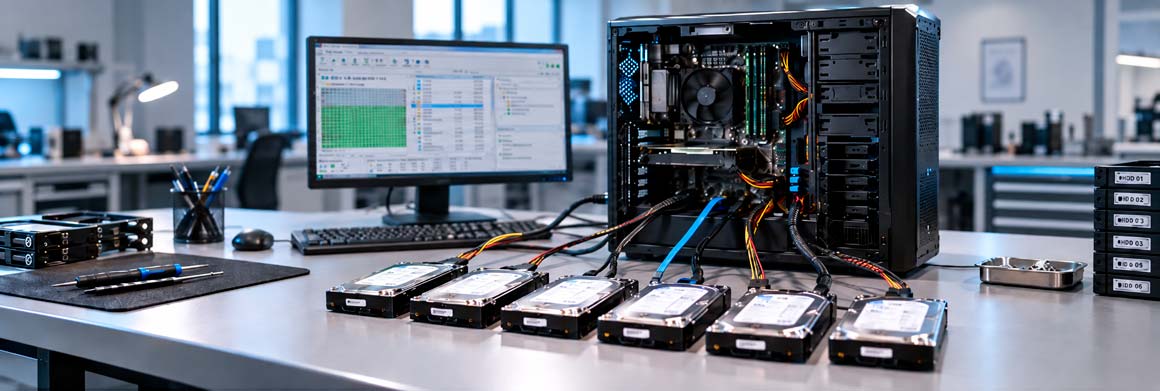
Aesonlabs provides professional data recovery from failed RAID arrays, NAS systems, SAN storage and virtual server environments. These cases can involve several dependent storage layers, beginning with the individual physical disks and RAID configuration and extending into storage pools, filesystems, virtual disks and guest operating systems.
RAID recovery is not simply a matter of replacing a failed disk and rebuilding the array. When multiple members have failed, become unstable or fallen out of synchronization, an incorrect rebuild can overwrite information required for recovery.
Different RAID layouts tolerate failure differently. The danger usually begins when an array is already degraded and a rebuild, re-sync or replacement is attempted before the condition of the remaining members has been verified.
Use the visualizer below to see how common RAID types change from a healthy state to a degraded array, then to a failed or unsafe recovery scenario.
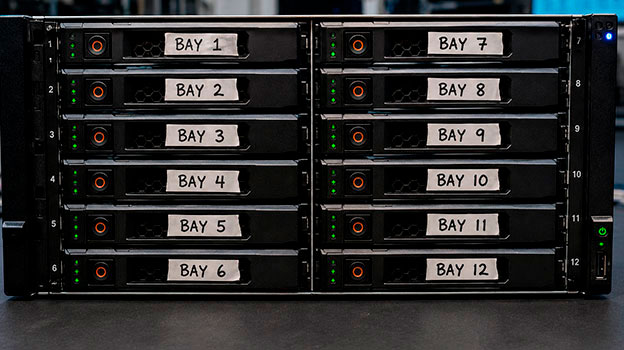
Before removing any disks, clearly label each drive according to its original bay or slot number and, whenever possible, photograph the complete drive arrangement. Do not shuffle the disks after removal.
Our objective is to preserve the original media, determine the condition and role of each member disk and reconstruct the storage configuration without modifying the source array.
RAID recovery is approached layer by layer: physical members first, then RAID geometry, then filesystems, storage pools and any virtual environments above them.
Disk order, bay position, controller history and the condition of every original member are documented before reconstruction begins.
Failed or weak members are handled individually and, where possible, imaged to controlled working copies before logical RAID work begins.
Disk order, RAID level, stripe size, parity rotation, data offset and member roles are determined from metadata and disk contents.
The reconstructed array is examined for filesystems, LVM, storage pools, ZFS, VMFS and other logical structures without writing to the originals.
Files, virtual disks and guest filesystems are recovered from the reconstructed storage and evaluated for completeness and consistency.
When the original RAID configuration is damaged, unavailable or stored inside a failed controller, the array can often be reconstructed independently of the original hardware. Depending on the RAID type, this can include disk order, RAID level, stripe or block size, parity rotation, data offset, number of members and the condition of each disk.
A recovery case may involve one completely failed disk, another partially readable member and several healthy drives. This mixed condition is one of the main reasons a forced rebuild can be dangerous.
A failed RAID controller does not necessarily mean the original controller must be repaired. In many cases, RAID parameters can be reconstructed directly from the member disks and available metadata.
If one or more members are unstable, those drives are addressed first. Controlled images allow logical reconstruction to proceed without repeatedly stressing weak original media.
Above the physical array may be storage pools, filesystems, snapshots, virtual disks, datastores and guest operating systems. Each layer is evaluated separately.
Aesonlabs can evaluate small two-disk mirrors, multi-disk parity arrays and large enterprise storage systems. As the number of members and logical layers increases, so does the complexity of identifying the original configuration and determining which components remain usable.
NAS systems from vendors such as Synology, QNAP, Western Digital, Buffalo, Netgear and Asustor can combine Linux RAID, proprietary metadata, LVM, storage pools, EXT4 or Btrfs, snapshots and encryption.
Recovering the RAID layer may therefore represent only the first stage of the recovery.
SAN environments may contain RAID groups, storage pools, LUNs, volumes, snapshots, datastores and virtual machines above the physical disk layer.
Large systems can also contain multiple RAID groups or disk shelves, so storage-group membership must be preserved before dismantling the system.
Recovery can involve damaged VMFS datastores, inaccessible or deleted VMDK files, corrupted virtual machines, snapshot-related failures and virtual disks located on failed RAID, NAS or SAN storage.
Some logical storage and server failures may be suitable for remote work when the physical disks are healthy and the system cannot reasonably be transported.
Failed or unstable member disks normally require physical media evaluation and imaging in the laboratory.
For most RAID recovery cases, the complete server or NAS chassis is not required. We normally require the original member disks that formed the affected array.
Before removing the drives, mark each one with its original bay or slot position—Bay 1, Bay 2, Bay 3, and so on—and photograph the installed order. If the system contains multiple RAID groups, pools or disk shelves, contact us before removing anything.
Heavy server chassis, controllers and rackmount hardware generally do not need to be shipped unless the recovery specifically requires them.
Reconstructing the RAID does not bypass encryption. BitLocker, encrypted NAS volumes, encrypted virtual machines and vendor-specific encryption may still require the original password, recovery key, certificate or other system component.
Clients should preserve all available credentials, recovery keys, certificates, configuration files and related system information.
The safest recovery procedure generally involves preserving the original media, identifying the condition of each member and working from controlled disk images whenever possible.
RAID, NAS, SAN and server recovery requires more than standard file-recovery software. A successful case can require physical disk diagnostics, individual member imaging, reconstruction of RAID geometry, identification of stale or missing members, filesystem recovery and, in virtualized environments, reconstruction of datastores and virtual disks.
Aesonlabs approaches these systems as a series of dependent storage layers. The physical disks are stabilized first, followed by reconstruction of the RAID or storage pool and then the logical filesystems or virtual environments above it.
In many cases, yes. RAID parameters such as disk order, RAID level, stripe size, parity configuration and data offset can often be reconstructed from the member disks without requiring the original controller.
Not if important data is already inaccessible or more than one member may be unstable. A rebuild writes to the array and can overwrite data needed for recovery. The remaining disks should be evaluated first.
Potentially. Recoverability depends on the RAID level, number of failed members, condition of the remaining disks and whether failed or unstable drives can be partially imaged.
Photograph the installed drive arrangement and clearly label every disk with its original bay or slot number. Do not change the disk order after removal.
Usually not. In most RAID recovery cases, the correctly labelled member disks are the most important components. Large server chassis and controllers generally do not need to be delivered unless the case specifically requires them.
Yes, depending on the failure. NAS recovery may involve the underlying RAID as well as Linux RAID metadata, LVM, storage pools, EXT4 or Btrfs filesystems, snapshots and other logical structures used by the appliance.
Potentially. Recovery can involve damaged VMFS datastores, missing or inaccessible VMDK files, corrupted virtual machines and failures originating in the RAID, NAS or SAN storage beneath the virtual environment.
Some logical storage and server failures may be suitable for remote work when the hardware is healthy and the system cannot reasonably be transported. Failed or unstable physical disks generally require laboratory evaluation.
The underlying storage may be recoverable, but encryption remains a separate layer. The appropriate password, recovery key, certificate or other encryption information may still be required to access the reconstructed data.
Submit the number of disks, RAID or storage platform, failure symptoms and any actions that were taken after the problem began. Before removing media, preserve the bay order and photograph the installed configuration.
Open a Recovery Case